Tuesday, July 9, 2013

Internal Navigation Structure – Site Architecture

Your website’s internal navigation structure can be thought as your website’s skeletal structure. Depending on the level or stage of life your website is at, your website architecture will typically follow most of these navigational rules.


Strategy & Technical SEO Points for Beginning a New or Current Website

A website’s home page amended by the webpage, creates your full webpage’s URL address. This address is the unique identifier in how a page is rendered. In addition, a search bot will view this URL as a unique page. It’s highly important you plan your URL formatting before launching your website.

URLs
  • Ensure all URLs consist of lowercase
  • Ensure there is no possible way through IIS re-write rules your URL can resolve with the same content from adding extra characters in the location where variables are written into the URL.
  • Develop your site’s structure with a relative path vs. an absolute path. For a search crawler, finding http://www.website.com and http://website.com is not efficient and could cause issues in correctly assigning a valid search weight to the intended webpage. Also, create a 301 redirect for all non-www request to point to the WWW version of the site.
  • Do not build your URLs by conjoining variables on a template page on a page by page basis. Store complete URLs in a database to reference your navigation. You want to ensure your URLs never change. You may also build a behind the scenes 301 redirect rule in the event you need to change a URL. However, it’s best never to change a URL.


Navigation
Navigation for your website starts with understanding the purpose of the website and key points of business. Websites overtime will become larger and require more attention as they progress. However, let’s not bite more than we can chew. Let’s say you want to start a small business for selling your services.

First, you need to identify all the points of the services you are selling. Write them out in a word document. This information can be broad or specific. Next, start organizing all of your selling points listing anything specific under your broad points. The information you have identified will be the most prominent part of your website navigation. Depending how much information you organized, you need enough categories to fill the header navigation of your site. CSS drop-down menus are often the best approach when your content becomes popular.

It’s typically best to start small in your navigation if no one has heard of your company, you want to course them to what you want them to read.

Parameters and Facets
Parameters and facets are typically a killer in wasting a search bots resources and creating duplicate content in their index. The best rule of thumb is to design your website by utilizing the <META NAME="ROBOTS" CONTENT="NOINDEX, NOFOLLOW"> when a facet or parameter exists.
Now, this does not mean you should use this tag for every page or dynamic section. You need to identify your complete list of facets and parameters and understand what they are doing. Are they sorting, filtering, tracking variable, etc… In addition, a facet or parameter can create qualified content if the page is optimized correctly. Therefore, you would want this page indexed.

You can manage your parameter setting in Google’s webmaster tools. You can also search Google to validate no pages are in the index by using the following format:

Site:yourcompany.com/ “?facetname=”

Search crawlers and indexing
Google search bot (crawler) will index your site from finding any link on your webpage to another webpage. It is highly important all pages are linkable from beginning with your homepage to the deepest directory level of your website. You do not want to create situations where Google thinks you have doorway pages. A doorway page is perceived as a page for the sole purpose of generating traffic and is not part of your internal navigation structure.

If you have a catalog of products, you want to make sure your sections don’t overwhelm a crawler too many times in locating the same pages over and over again. Your website is set with a specific crawl setting that involves the frequency of visits and the amount of time a crawler will spend in each session of your website. Using <META NAME="ROBOTS" CONTENT="NOINDEX, NOFOLLOW"> rules correctly can efficiently raise the number of pages Google will set in their index.

As a tip, you should actively check for 404 and server errors in Google webmaster tools to identify any potential issues.

Finally, session ids are another killer of wasting Google’s resources and creating a vast amount of duplicate content. You never want to develop your website where a search bot comes in and is given a session id in the URL. Develop a list of search engine IPs and create a rule to not to include session ids.

Summary
These topics are merely examples of what a strong technical SEO should be monitoring and taking action against. Your navigation reflects the user experience whether or not they are directed in finding the important pieces of content that you want them to read. In addition, a strong technical implementation needs to be set in place in order to be allowed to receive your appropriate amount of search traffic. You can get traffic if your foundation is built upon quicksand.

Monday, July 8, 2013

E-commerce & Avg. Transaction Value in Google Analytics

When analyzing transaction data in Google Analytics, do you ever come to the conclusion you simply are not getting enough transactions. There are many individuals that ignore the average transaction value. However, this is simply due to not knowing of methods in how to apply it to business.


Why is the Avg. Transaction Value important?


This is your base-line or median to determine how much trust and effectiveness in how your products are presented to the user. Let's say your avg. transaction value is $450 and you are obtain no more than 5 transactions a day, yet have over 5,000 products and 2,000 web visitors. Reasoning would suggest you should be making more transactions. Let's dig a little deeper to see how we can fix the problem.

  • You need to assess how many products you have on your website.
  • Next, determine how many of those products are priced
  • Determine how many of those products are competitively priced. If there are rules in the products you are selling at a minimum manufacturer price, you would want to include these as “not very competitive”.


Now that you have collected and are monitoring this data, you can move forward for reporting. You should be monitoring the following:

  • % of priced products and quantity on the website from your entire web catalog
  • % of competitively priced products and quantity on the website from your entire web catalog
  • The number of transactions above and below your avg. transaction price.
  • The rolling revenue off the first transaction of the customer (you can even apply the avg. transaction value and create a deeper segment).


Treat priced and competitively priced products as different segments when comparing the number of transactions. You first need to understand the frequency of your transactions based on your entire exposure online. Once you determine a pattern in transactions, you can adjust your strategy to focus on improving the remainder of products not priced or priced competitively. In addition, you may need to focus on adding more products in your market under your average transaction value.

By doing this, you increase transactions which leads for more repetitive growth for larger transactions. You may enter the site by purchasing a wallet one day and 2 months later, you come back and purchase a HD TV.

The key is tracking these metrics to assign a plan in improving your weak points in E-commerce. By aiming to improve these metrics, revenues and web traffic will increase.


Finally words of wisdom: Google SEO comes in to play by throttling web traffic. Therefore, if you continually pump products in where a conversion is not likely to happen, you thin-out your internal PR juice run-of-site. This may lead to less traffic to more important products if they are not positioned right on your website. If the majority of those products are not priced, interaction will be less likely to occur through conversion.

Sunday, July 7, 2013

The Importance of the Title tag with Google SEO

The Title tag is the most important element in determining relevance for a web page. You want to make sure you are as specific as possible when naming your page. If your page is about “Blue Widgets”, your page should not be titled just “Widgets”. Now, depending on the size of your website and resources available, it may not be practical to address every single web page title right away.
You need to focus on your users. What are your most popular web pages? This type of thinking can generate a list of pages to focus on. Viewing your top pages in Google Analytics is one way of viewing this information. In addition, if a lot of web pages on your site are dynamically generated, you may want to implement a logical re-visioning in code by setting rule-sets in how to trim them down.

The best part about optimizing for title tags with dynamic pages comes with all the glorious rules you can set forth. Here are some examples in scenarios in what you can do to optimize.

  • Set the maximum character count to 70. This included any data entry or tool set point for the field.
  • Set the maximum character count in the database of the pertaining field.
  • When selling products, ensure you list the Brand of the product first, then list the products description or model number keywords.
  • Set a variable in your implementation to ensure the Title tag can not be dynamically changes unless there is some form of validation from the user (boolean value).
  • If a user somehow manages to enter in more than 70 characters, have the developer check the string and remove the ending characters of the title. This will ensure you have no incomplete pieces of text that takes away from the weight of keywords in the title.
  • You may also include the brand at the end of the page. The title can appear as Blue Widgets – Your Website Name without the .com. However, never sacrifice listing the brand name if your title is within the 70 character limit. You should have a developer dynamically count the length of your website name and only include it, if all full characters can fit in the title while including your website's name. Listing your website's name is important to build recognition in the search listing. A user is more likely to click a link with Ebay in the title vs. some unknown website.


If you have a smaller website, you should use Google's keyword tool to best populate the title of your page. You should consider the volume of searches and the level of competition of the keyword phrase. Another tactic when developing your title tag is to ensure it is a little unique vs. any heading tags in place (h1, h2, etc..). This gives a slight boost in uniqueness of the page.


As a final note, the closer the keyword phrase is to the beginning of the title tag, the stronger the weighting will be. You never want to list your company site first for any unique page. The exception to this rule can be your home page if you are concentrating on building brand identity.

Understanding the Meta Description Tag with Google Search

The Meta description tag is primarily used to improve your click-thru rate in Google search results. With the proper formatting and query performed by the user, you can trigger this information in the search results. This meta tag incredibly strong when your descriptive information represents the intent of the Google user performing a query. Google will decide the relevance of the query and description inside the meta tag to determine what to display for the user. Let's take a look at Google query exercise:
  1. Go to Google.com
  1. Search for PC Headsets
  1. Scan for the Newegg.com result and notice the information below the hyperlink. The Description should read “Sound Cards and Speakers at Newegg.com. We offer the best prices, fast shipping and top-rated customer service. Once you know, you Newegg.”
  1. Next, click the result
  1. Next, Right click on the web page and view source
  1. Ctlr + F and search for <meta name=”description”
  1. You should see <meta name="description" content="Sound Cards and Speakers at Newegg.com.&#160; We offer the best prices, fast shipping and top-rated customer service.&#160; Once you know, you Newegg.">

It is important to understand that the meta description does not directly affect the ranking of your content. It only aids in the click-thrus to your content. Now, overtime, if the click-thru rate increases, your rank could go up as a result, but the mere fact of optimizing the meta description with your keywords has no direct affect on your query rank.

Reference for proper implementation
  1. Ensure you encase the meta description tag inside the <head> tag.
  2. <meta name="description" content="Your Content Here to Describe the Webpage">

Tuesday, February 19, 2013

Not Provided vs. Not Set in Google Analytics

What is the difference between Not Provided and Not Set under the keywords section in Google Analytics?

Answer:

Not Provided occurs when a user is browsing on an encrypted URL at Google.com. If you are logged in to your Google+ account, you will automatically be on https://. This means the more users that use Google+, the more you will not be able to see what keywords brought them to your website.

Not Set is simply a referral or direct visit with no keywords that are allowed to be passed. Sometimes a user can search from their browser and end up on the site and this may propagate (Not Set).

Tip:

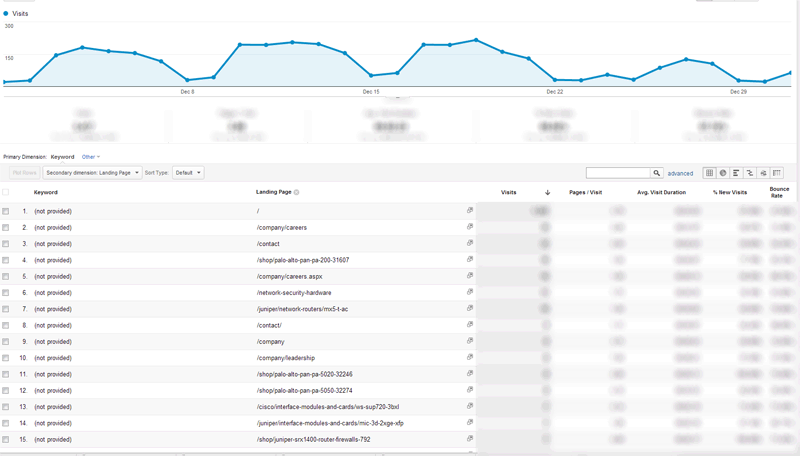
You can click (not provided) and view the landing pages as a secondary dimension to at least figure out what pages are being viewed the most. You could also compare this to the known organic keyword traffic and attribute a estimated percentage in distribution to each known organic keyword.

Click to Enlarge - You could also do unique page views for increased accuracy to attribute to other relateed keywords for each individual content page.

Friday, February 8, 2013

ACL Definition, What is ACL


The Access Control list is the list is a data structure, usually a table, containing entries that specify individual user or group rights to specific system objects, such as a program, a process, or a file. These entries are known as access control entries (ACE) in the Microsoft Windows and OpenVMS operating systems. Each accessible object contains an identifier to its ACL. The privileges or permissions determine specific access rights, such as whether a user can read from, write to or execute an object. In some implementations an ACE can control whether or not a user, or group of users, may alter the ACL on an object.

The ACL is a concept with several different implementations in various operating systems, although there is a POSIX "standard" (the POSIX security drafts, .1e and .2c, were withdrawn when it became clear their scope was too wide and the work would not complete, but the well-developed parts defining ACLs have been widely implemented and are known as "POSIX ACLs").

ACL implementations can be quite complex. ACLs can apply to objects, directories and other containers, and for the objects and the containers created within this container. ACLs cannot implement all of the security measures that one might wish to have on all systems, and a fine-grained capability-based access control system may be a better approach, with the authority transferred from the objects being accessed to the objects seeking access — allowing for much finer-grained control.

In networking, the term Access Control List (ACL) refers to a list of service ports or (network) daemon names that are available on a host, each with a list of hosts and/or networks permitted to use the service. Both individual servers as well as routers can have network ACLs. Access control lists can generally be configured to control both inbound and outbound traffic, and in this context they are similar to firewalls.

ADP Definition, What is ADP


ADP or Automatic Data Processing, Inc. (NYSE: ADP) is the largest provider of computerized transaction processing and information-based solutions serving more than 570,000 clients worldwide. ADP Employer Services provides human resources, payroll and benefits administration solutions for companies of all sizes throughout the U.S. and in major markets around the world. ADP Dealer Services provides integrated dealer management system (DMS) solutions to automotive, heavy truck, motorcycle, marine and RV dealers and manufacturers in North America.

History of Automatic Data Processing

ADP was founded in 1949 by Henry Taub in Paterson, New Jersey as Automatic Payrolls, Inc. The first ADP office, above Grinker's Ice Cream shop, processed payroll manually with a bookkeeping machine, addressograph equipment, calculators and comptometers. The company's first account was New Era Dye and Finishing in Fair Lawn, New Jersey. With the introduction of punch card machines, mainframe computers and check printing machines, Automatic Payrolls became Automatic Data Processing in 1958.

ADP became a public company in 1961, with an initial stock price of $3. In the next year, Brokerage Services division was developed to serve the high volume transaction needs of major stock brokerages on Wall Street. The company proceeded to offer Dealer Services to automotive dealers to handle inventory and accounting transactions. In 1974, ADP extended into the international market with an office in The Netherlands, and later in the decade added Claims Services.

Today ADP employs more than 42,000 associates globally providing business solutions for more than 570,000 companies of all sizes � small, mid-market and enterprise.
Business Units

ADP Employer Services

The Employer Services business unit is the oldest, largest and most profitable of ADP's divisions. It includes payroll processing, HR outsourcing, 401(k)/Retirement Services, Professional Employer Organization (PEO), Time and Labor Management, Tax and Compliance Management, Benefits Administration, Screening and Selection Services, and Administrative Service Offerings (ASO). ADP's payroll services are so widespread that one in six Americans have their paychecks processed by the company.

ADP Dealer Services

In 1972, Dealer Services was created for automobile dealer front end management, business office, parts and service departments.

ADP Claims Services

ADP's Claims Services was created to assist insurance companies with property and casualty claims, automotive recycling, and collision repair in 1979. This division was sold off because its growth potential was far less than the other divisions of the company.

ADP Brokerage Services

This division of ADP was created in 1962 to service stock brokerages. Oppenheimer & Co. became the first client, averaging 300 trades per day. By 1999, ADP was processing over a million trades in a day. This business was spun off in 2007 into a company called Broadridge Financial Solutions (NYSE: BR), removing about $2 billion from ADP's total yearly revenue.

ADP References

ADP Directors and Corporate Officers
Jeffrey R. Yost (2005). The Computer Industry. Greenwood Press. ISBN 0313328447.
Edward J. Kanarkowski (1999). ADP 50th Anniversary Book. ADP.
College Savings Boosted by ADP's 529 Payroll Deduction Program
ADP Completes Spin-off of Brokerage Services Group Business

Access Privileges Definition, What is Access Privileges


Access Privileges is the extent to which a user may operate a system resource on a network or a file server.In many cases, permission to access a server, view its contents and modify or create files is limited by the network's system administrator in order to maintain security.

Privileges in Computer Science

A privilege in a computer system is a permission to perform an action. Examples of various privileges include the ability to create a file in a directory, or to read or delete a file, access a device, or have read or write permission to a socket for communicating over the Internet.

Privileges can either be automatic, granted, or applied for.

An automatic privilege exists when there is no requirement to have permission to perform an action. For example, on systems where people are required to log into a system to use it, logging out will not require a privilege. Systems that do not implement file protection - such as MSDOS - essentially give unlimited privilege to perform any action on a file.

A granted privilege exists as a result of presenting some credential to the privilege granting authority. This is usually accomplished by logging on to a system with a username and password, and if the username and password supplied are correct, the user is granted additional privileges.

A privilege is applied for by either an executed program issuing a request for advanced privileges, or by running some program to apply for the additional privileges. An example of a user applying for additional privileges is provided by the sudo command to run a command as the root user, or by the Kerberos authentication system.

Modern processor architectures have CPU modes that allows the OS to run at different privilege levels. Some processors have two levels (such as user and supervisor); i386+ processors have four levels (#0 with the most, #3 with the least privileges). Tasks are tagged with a privilege level. Resources (segments, pages, ports, etc.) and the privileged instructions are tagged with a demanded privilege level. When a task tries to use a resource, or execute a privileged instruction, the processor determines whether it has the permission (if not, a "protection fault" interrupt is generated). This prevents user tasks from damaging the OS or each other.

Actuator Definition, What is Actuator


An actuator is the mechanism by which an agent acts upon an environment. The agent can be either an artificial intelligent agent or any other autonomous being (human, other animal, etc).

Examples and Applications of Actuators

  • Human - Arms, hands, fingers, legs
  • Part picking robot - Grasping mechanism, moving parts. Examples include solenoids and voice coil actuators.
  • Mail transfer agent - Update software
  • In engineering, actuators are a subdivision of transducers. They are devices which transform an input signal (mainly an electrical signal) into motion. Electrical motors, pneumatic actuators, hydraulic pistons, relays, comb drive, piezoelectric actuators, thermal bimorphs, Digital Micromirror Devices and electroactive polymers are some examples of such actuators.
  • Motors are mostly used when circular motions are needed, but can also be used for linear applications by transforming circular to linear motion with a bolt and screw transducer. On the other hand, some actuators are intrinsically linear, such as piezoelectric actuators.
  • In virtual instrumentation actuators and sensors are the hardware complements of virtual instruments. Computer programs of virtual instruments use actuators to act upon real world objects.

Action Statement Definition, What is Action Statement

A action statement is a command used in various programming languages that performs an action such as opening a file, saving a file, etc...

A+ Definition, What is A+


The Comptia A+ is a certification and administrated by Drake Parametric covering both hardware and software for the IBM compatible and Macintosh platforms. The Comptia A+ certification is a nice certification for most computer technical jobs.

CompTIA A+ certification validates the latest skills needed by today's computer support professionals. The CompTIA A+ certification is an certification recognized by major hardware and software distributors, vendors, and resellers. CompTIA A+ confirms a technician's ability to perform tasks such as installation, configuration, diagnosing, preventive maintenance and basic networking. The Comptia A+ exams also cover area domains such as safety, security, and environmental issues and communication and professionalism. Some commonly known A+ certifications are Comptia A+ Essentials, Comptia A+ 220-602, Comptia A+ 220-603, and Comptia A+ 220-604.

Adder Definition, What is an Adder


An adder is a component of a computer processor that adds two numbers sent from the processing instructions. It is also a circuit that sums the amplitudes of two input signals. A half adder is a group of logic gates that are connected to create a logic circuit, incapable of handling addition for two numbers.  A full adder is a circuit that adds two binary numbers.

ADC Definition, What is ADC


ADC is short for Analog Digital Converter, Sometimes called a A-D. An ADC is a device that converts a continuous analog signal to a multi-level digital signal without altering its content. The signals that are monitored are sounds, movement, and temperature into binary code for the PC. There are four commonly used ADC used today; the parallel converter, the successive approximation ADC, voltage-to-frequency ADC and the integrating ADC. The ADC converter may be contained on a single chip or can be one circuit within a chip.

Every camcoder, digital camera, or scanner uses A/D converters to transform the variable charges in CCD and CMOS chips into the binary data that represent pixels. Every cellphone and digital desk phone has an ADC converter that converts the pressure of sound waves into PCM code.

AC Definition, What is AC


An alternating current (AC) is an electrical current whose magnitude and direction vary cyclically, as opposed to direct current, whose direction remains constant. The usual waveform of an AC power circuit is a sine wave, as this results in the most efficient transmission of energy. However in certain applications different waveforms are used, such as triangular or square waves.

Used generically, AC refers to the form in which electricity is delivered to businesses and residences. However, audio and radio signals carried on electrical wire are also examples of alternating current. In these applications, an important goal is often the recovery of information encoded (or modulated) onto the AC signal.

History of AC (Alternating Current)

William Stanley designed one of the first practical devices to transfer AC power efficiently between isolated circuits. Using pairs of coils wound on a common iron core, his design, called an induction coil, was an early precursor of the modern transformer. The system used today was devised by many contributors including Nikola Tesla, George Westinghouse, Lucien Gaulard, John Gibbs, and Oliver Shallenger from 1881 to 1889. AC systems overcame the limitations of direct current systems, such as that which Thomas Edison first used to distribute electricity commercially.

The first long-distance transmission of alternating current took place in 1891 near Telluride, Colorado, followed a few months later in Germany. Thomas Edison strongly advocated the use of direct current (DC), having many patents in that technology, but eventually alternating current came into general use (see War of Currents).

The first modern commercial power plant using three-phase alternating current was at the Mill Creek hydroelectric plant near Redlands, California in 1893. Its designer was Almirian Decker, a brilliant young engineer. Decker's innovative design incorporated 10,000 volt three phase transmission and established the standards for the complete system of generation, transmission and motors used today. And through the use of alternating current, Charles Proteus Steinmetz of General Electric was able to solve many of the problems associated with electricity generation and transmission.

Transmission, distribution, and domestic power supply of AC (Alternating Current)

AC voltage can be stepped up or down by a transformer to a different voltage. Modern High-voltage, direct current electric power transmission systems contrast with the more common alternating-current systems as a means for the bulk transmission of electrical power over long distances. However, these tend to be more expensive and less efficient than transformers, and did not exist when Edison, Westinghouse and Tesla were designing their power systems.

Use of a higher voltage leads to more efficient transmission of power. The power losses in a conductor are a product of the square of the current and the resistance of the conductor, described by the formula P = I2R. This means that when transmitting a fixed power on a given wire, if the current is doubled, the power loss will be four times greater. Since the power transmitted is equal to the product of the current, the voltage and the cosine of the phase difference f (P = IVcosf), the same amount of power can be transmitted with a lower current by increasing the voltage. Therefore it is advantageous when transmitting large amounts of power to distribute the power with high voltages (often hundreds of kilovolts). However, high voltages also have disadvantages, the main ones being the increased insulation required, and generally increased difficulty in their safe handling. In a power plant, power is generated at a convenient voltage for the design of a generator, and then stepped up to a high voltage for transmission. Near the loads, the transmission voltage is stepped down to the voltages used by equipment. Consumer voltages vary depending on the country and size of load, but generally motors and lighting are built to use up to a few hundred volts between phases.

Three-phase electrical generation is very common. Three separate coils in the generator stator are physically offset by an angle of 120 degrees to each other. Three current waveforms are produced that are equal in magnitude and 120 degrees out of phase to each other.

If the load on a three-phase system is balanced equally between the phases, no current flows through the neutral point. Even in the worst-case unbalanced (linear) load, the neutral current will not exceed the highest of the phase currents. For three-phase at low (normal mains) voltages a four-wire system is normally used. When stepping down three-phase, a transformer with a Delta primary and a Star secondary is often used so there is no need for a neutral on the supply side.

For smaller customers (just how small varies by country and age of the installation) only a single phase and the neutral or two phases and the neutral are taken to the property. For larger installations all three phases and the neutral are taken to the main distribution panel. From the three-phase main panel, both single and three-phase circuits may lead off.

Three-wire single phase systems, with a single centre-tapped transformer giving two live conductors, is a common distribution scheme for residential and small commercial buildings in North America. A similar method is used for a different reason on construction sites in the UK. Small power tools and lighting are supposed to be supplied by a local center-tapped transformer with a voltage of 55V between each power conductor and the earth. This significantly reduces the risk of electric shock in the event that one of the live conductors becomes exposed through an equipment fault whilst still allowing a reasonable voltage for running the tools.

A third wire is often connected between non-current carrying metal enclosures and earth ground. This conductor provides protection from electrical shock due to accidental contact of circuit conductors with the case of portable appliances and tools.

(Alternating Current) AC Power Supply Frequencies

The frequency of the electrical system varies by country; most electric power is generated at either 50 or 60 Hz. See List of countries with mains power plugs, voltages and frequencies. Some countries have a mixture of 50 Hz and 60 Hz supplies, notably Japan.

A low frequency eases the design of low speed electric motors, particularly for hoisting, crushing and rolling applications, and commutator-type traction motors for applications such as railways, but also causes a noticeable flicker in incandescent lighting and objectionable flicker of fluorescent lamps. 16.7 Hz power (approx. ? of the mains frequency) is still used in some European rail systems, such as in Austria, Germany, Norway, Sweden and Switzerland.

Off-shore, textile industry, marine, computer mainframe, aircraft, and spacecraft applications sometimes use 400 Hz, for benefits of reduced weight of apparatus or higher motor speeds.

No matter if you need to know "what is a Abstract Syntax Notation One", the definition of a "Abstract Syntax Notation One", or the meaning of a "Abstract Syntax Notation One", you can find it here at Network Liquidators. There's quite a bit of information out there to learn, and it all starts by you having the initiative to seek out that information.

Effects at High Frequencies

A direct, constant, current flows uniformly throughout the cross-section of the (uniform) wire that carries it. With alternating current of any frequency, the current is forced towards the outer surface of the wire, and away from the center. This is due to the fact that an electric charge which accelerates (as is the case of an alternating current) radiates electromagnetic waves, and materials of high conductivity (the metal which makes up the wire) do not allow propagation of electromagnetic waves. This phenomenon is called skin effect.

At very high frequencies the current no longer flows in the wire, but effectively flows on the surface of the wire, within a thickness of a few skin depths. The skin depth is the thickness at which the current density is reduced by 63%. Even at relatively low frequencies used for high power transmission (50-60 Hz), non-uniform distribution of current still occurs in sufficiently thick conductors. For example, the skin depth of a copper conductor is approximately 8.57mm at 60 Hz, so high current conductors are usually hollow to reduce their mass and cost.

Since the current tends to flow in the periphery of conductors, the effective cross-section of the conductor is reduced. This increases the effective AC resistance of the conductor, since resistance is inversely proportional to the cross-sectional area in which the current actually flows. The AC resistance often is many times higher than the DC resistance, causing a much higher energy loss due to skin effectohmic heating (also called I2R loss).

Techniques for Reducing AC (Alternating Current) Resistance

For low to medium frequencies, conductors can be divided into stranded wires, each insulated from one other, and the individual strands specially arranged to change their relative position within the conductor bundle. Wire constructed using this technique is called Litz wire. This measure helps to partially mitigate skin effect by forcing more equal current flow throughout the total cross section of the stranded conductors. Litz wire is used for making high Q inductors, reducing losses in flexible conductors carrying very high currents at power frequencies, and in the windings of devices carrying higher radio frequency current (up to hundreds of kilohertz), such as switch-mode power supplies and radio frequency transformers.
Techniques for reducing radiation loss

As written above, an alternating current is made of electric charge under periodic acceleration, which causes radiation of electromagnetic waves. Energy that is radiated represents a loss. Depending on the frequency, different techniques are used to minimize the loss due to radiation

Twisted pairs
At frequencies up to about 1 GHz, wires are paired together in cabling to form a twisted pair in order to reduce losses due to electromagnetic radiation and inductive coupling. A twisted pair must be used with a balanced signalling system, where the two wires carry equal but opposite currents. The result is that each wire in the twisted pair radiates a signal that is effectively cancelled by the other wire, resulting in almost no electromagnetic radiation.

Coax cables
At frequencies above 1 GHz, unshielded wires of practical dimensions lose too much energy to radiation, so coaxial cables are used instead. A coaxial cable has a conductive wire inside a conductive tube. The current flowing on the inner conductor is equal and opposite to the current flowing on the inner surface of the outer tube. This causes the electromagnetic field to be completely contained within the tube, and (ideally) no energy is radiated or coupled outside the tube. Coaxial cables have acceptably small losses for frequencies up to about 20 GHz. For microwave frequencies greater than 20 GHz, the dielectric losses (due mainly to the dissipation factor of the dielectric layer which separates the inner wire from the outer tube) become too large, making waveguides a more efficient medium for transmitting energy.

Waveguides
Waveguides are similar to coax cables, as both consist of tubes, with the biggest difference being that the waveguide has no inner conductor. Waveguides can have any arbitrary cross section, but rectangular cross section are the most common. With waveguides, the energy is no longer carried by an electric current, but by a guided electromagnetic field. Waveguides have dimensions comparable to the wavelength of the alternating current to be transmitted, so are only feasible at microwave frequencies.

Fiber optics
At frequencies greater than 200 GHz, waveguide dimensions become impractically too small, and the ohmic losses in the waveguide walls become large. Instead, fiber optics, which are a form of dielectric waveguides, can be used. For such frequencies, the concepts of voltages and currents are no longer used.


References

  • "AC/DC: What's the Difference?". Edison's Miracle of Light, American Experience. (PBS)
  • "AC-DC: Inside the AC Generator". Edison's Miracle of Light, American Experience. (PBS)
  • Kuphaldt, Tony R., "Lessons In Electric Circuits : Volume II - AC". March 8, 2003. (Design Science License)
  • Nave, C. R., "Alternating Current Circuits Concepts". HyperPhysics.
  • "Alternating Current (AC)". Magnetic Particle Inspection, Nondestructive Testing Encyclopedia.
  • "Alternating current". Analog Process Control Services.
  • Hiob, Eric, "An Application of Trigonometry and Vectors to Alternating Current". British Columbia Institute of Technology, 2004.
  • "Introduction to alternating current and transformers". Integrated Publishing.
  • "Wind Energy Reference Manual Part 4: Electricity". Danish Wind Industry Association, 2003.
  • Chan. Keelin, "Alternating current Tools". JC Physics, 2002.
  • "Measurement -> ac". Analog Process Control Services.
  • Williams, Trip "Kingpin", "Understanding Alternating Current, Some more power concepts".
  • "Table of Voltage, Frequency, TV Broadcasting system, Radio Broadcasting, by Country".
  • Professor Mark Csele's tour of the 25 Hz Rankine generating station
  • 50/60 hertz information
  • AC circuits Animations and explanations of vector (phasor) representation of RLC circuits
  • Blalock, Thomas J., "The Frequency Changer Era: Interconnecting Systems of Varying Cycles". The history of various frequencies and interconversion schemes in the US at the beginning of the 20th century


Acknowledgement Definition, What is Acknowledgement


In computing, an Acknowledgement is a signal passed between communicating processes or computers to signify acknowledgement, or receipt of response, as part of a communications protocol. For instance, Acknowledgement packets are used in the Transmission Control Protocol during establishment and termination of connections.

Short for acknowledgement, ACK is a response given by another computer or network device indicating to another computer that it acknowledged the SYN/ACK or other request sent to it.

Access Denied Definition, What is Access Denied


Access Denied is a message displayed when unable to obtain access to a location that you have not been granted the proper access rights or do not have permission to access.

If you are attempting to access a network share or resource on a network, Intranet, or the Internet and are receiving this error, you must contact the administrator or individual responsible for that network to obtain rights to that resource.

Although this error is commonly caused by a user accessing something he or she may not have rights to access, this error can also be caused by a hardware error. If you are attempting to access a hardware device on your computer (not a network) and are receiving this error, it is possible you may have a problem with that device. We recommend you review the support page in our hardware database for additional help or information with the hardware device.

Accelerator Definition, What is Accelerator


Accelerator is usually a device or program designed to improve the speed of a hardware peripheral or software program.

A good example of an accelerator would be a graphics or 3D accelerator. A graphics accelerator is a hardware peripheral that contains its own processor and RAM enabling the card to perform at accelerated speeds without decreasing the performance of the computer.

Other examples of accelerators are various utilities used to increase the performance of hardware devices. For example, a download accelerator is used to help increase the speed of download times on computer modems.

Hardware Accelerator

In computing, hardware acceleration is the use of hardware to perform some function faster than is possible in software running on the normal (general purpose) CPU. Examples of hardware acceleration include blitting acceleration functionality in graphics processing units (GPUs) and instructions for complex operations in CPUs.

The hardware that performs the acceleration, when in a separate unit from the CPU, is referred to as a hardware accelerator, or often more specifically as graphics accelerator or floating-point accelerator, etc. Those terms, however, are outdated and have been replaced with more descriptive terms like video card or graphics card.

Web Accelerator

A web accelerator is a proxy server that reduces web site access times. Web accelerators may use several techniques to achieve this reduction:

  • They may cache recently or frequently accessed documents so they may be sent to the client with less latency or at a faster transfer rate than the remote server could.
  • They may freshen objects in the cache ensuring that frequently accessed content is readily available for display.
  • They may prefetch documents that are likely to be accessed in the near future.
  • They may compress documents to a smaller size, for example by reducing the quality of images or by sending only what's changed since the document was last requested.
  • They may filter out ads and other undesirable objects so they are not sent to the client at all.
  • They may maintain persistent TCP connections between the client and the proxy server.

Web accelerators may be installed on the client (browsing) computer / mobile device or on ISP hosted servers or both. Accelerating delivery through compression requires some type of host based server to collect, compress and then deliver content to a client computer.

As of July 2006, these applications generally serve to improve dial-up, broadband and other connections that users may not be getting the best speed from. Many users can achieve a 2 to 10 times speed increase in average browsing experience, while some report a 5 to 20 times speed increases for specific web sites and pages. Many ISPs offer web accelerators as a part of their dial up and broadband services. Web accelerators are typically designed for web browsing and, sometimes, for e-mailing and can not improve speeds of streaming, gaming, P2P downloads or many other Internet applications.

Other web accelerators are targeted at the web site or web application owners. This type of web accelerator is installed in front of web servers and application servers and use a variety of the above techniques to improve performance to all users accessing the accelerated web sites or web applications.

Active Components Definition, What are Active Components


In electronics, active components are components that can be used to provide power gain in an electronic circuit. This means that the power of their output signal may be more than that of their input signal. This added power is provided by another power source. The most common active components are transistors. One of the basic uses of transistors is in making amplifiers. In a simple transistor amplifier, there's an AC input signal (a current, a voltage or both i.e. a power) that needs to be amplified. A DC power supply is used to provide the additional power needed. This DC supply is said to bias the transistor.

Examples of Active Components

  • Transistors >> Bipolar Juction Trasistors >> MOSFETS
  • Transistors >> Bipolar Juction Trasistors >> JFETS
  • Operational Amplifiers
  • Vaccuum Tubes >> Triodes
  • Vaccuum Tubes >> Tetrodes
  • Vaccuum Tubes >> Pentodes
  • Vaccuum Tubes >> Heptodes
  • Tunnel Diodes (depending on their bias)


Nonlinear Passive Components

The following devices do not fit the definition generally ascribed to active components, but because of their nonlinear responses, designs, histories, and uses in circuits, are sometimes presented alongside active components in textbooks and educational materials.

  • Junction Diodes
  • Step recovery Diodes
  • Thermionic Diodes
  • Thyristors
  • Varactor Diodes
  • Tunnel Diodes

Adobe Illustrator Definition, What is Adobe Illustrator


Adobe Illustrator is a vector-based drawing program developed and marketed by Adobe Systems.

History of Adobe Illustrator

Adobe Illustrator was first developed for the Apple Macintosh in 1986 (shipping in January 1987) as a logical commercialization of Adobe's in-house font development software and PostScript file format.

Initial Release of Adobe Illustrator

In many ways Illustrator's release was a gamble: the Macintosh did not have high market share, the only printer that could output Illustrator documents was Apple's own LaserWriter (also very new and expensive), and the drawing paradigm of Bezier curves was novel to the mainstream user. Not only did the Macintosh show only monochrome graphics, but display options were basically limited to its built-in 9" monitor. Illustrator helped drive the development of larger monitors for the Macintosh.

Illustrator was a reliable, capable product, however, and its relatively shallow learning curve let users quickly appreciate that the new paradigm was not only better, but finally solved the problem of imprecision from existing programs like MacDraw. It also provided a tool for people who could neither afford nor learn high-end (and perhaps overkill) software such as AutoCAD. Illustrator successfully filled a niche between painting and CAD programs.

Illustrator's power and simplicity derive from the choice of Bezier curves as the primary document element. A degenerate curve provides a line, and circles and arcs (trigonometric shapes) can be emulated closely enough. In a novel twist, Adobe also made Illustrator documents true PostScript files -- if one wanted to print them, one could send them directly to a PostScript printer instead of printing them from Illustrator. Since PostScript is a readable text format, third-party developers also found it easy to write programs that generated Illustrator documents.

Adobe was willing to take risks with Illustrator's user interface. Instead of following Apple's UI guidelines to the letter or imitating other popular Macintosh programs, they made it possible to switch between the various navigation tools (i.e, Zoom and Pan) using various keyboard key combinations.

Adobe Illustrator Versions 2 - 5

Although Adobe developed Illustrator primarily for the Macintosh during its first decade, it sporadically supported other platforms. In the early 1990s, Adobe released versions of Illustrator for NeXT, Silicon Graphics IRIX, and Sun Solaris platforms, but they were discontinued due to poor market acceptance. The first version of Illustrator for Microsoft Windows, version 2.0, was released in early 1989, but it was a flop. The next Windows version, version 4.0, was widely criticized as being too similar to Illustrator 1.1 instead of the Macintosh 3.0 version, and certainly not the equal of Windows' most popular illustration package CorelDraw. (Note that there were no versions 2.0 or 4.0 for the Macintosh.) Version 4 was, however the first version of Illustrator to support editing in preview mode, which did not appear in a Macintosh version until 5.0 in 1993.

Adobe Illustrator Versions 6 - 10

With the introduction of Illustrator 6 in 1996, Adobe made critical changes in the user interface with regards to path editing (and also to converge on the same user interface as Adobe Photoshop), and many users opted not to upgrade. To this day, many users find the changes questionable. Illustrator also began to support TrueType, making the "font wars" between PostScript Type 1 and TrueType largely moot. Like Photoshop, Illustrator also began supporting plug-ins, greatly and quickly extending its abilities.

With true ports of the Macintosh versions to Windows starting with version 7 in 1997, designers could finally standardize on Illustrator. Corel did port CorelDRAW 6.0 to the Macintosh in late 1996, but it was received as too little, too late. Aldus ported FreeHand to Windows but it was not the equal of Illustrator. Adobe bought Aldus in 1994 for PageMaker, and as part of the transaction it sold FreeHand to Macromedia.

With the rise of the Internet, Illustrator was enhanced to support Web publishing, rasterization previewing, PDF, and SVG.

Adobe Illustrator Versions CS (11) & CS2 (12)

Adobe Illustrator is currently (as of March 2007) in version 12 (called CS2 to reflect its integration with Adobe's Creative Suite) and is available for both the Mac OS X and Microsoft Windows operating systems. Illustrator CS was the first version to include 3-dimensional capabilities allowing you extrude or revolve shapes to create simple 3-d objects.

Among the new features included in Illustrator CS2 are Live Trace, Live Paint, a control palette and custom workspaces. Live Trace allows for the conversion of bitmap imagery into vector art. Live Paint allows users more flexibility in applying color to objects, specifically those that overlap.

Adobe Illustrator Versions CS (13)

This version of Adobe Illustrator was announced on March 27, 2007, and shipped on April 16. The Mac version is a universal binary. New features include Live Color, which provides tools for creating color harmonies based on color theory, and the ability to dynamically apply colors to selected objects and shift the tone of an entire illustration at one time. Remapping controls are also provided for reducing the numbers of colors in an artwork. Also new are better integration with Flash, with named symbol instances and dynamic/static text; improved drawing tools and controls; faster runtime performance; an Eraser tool that works on vector objects; a Crop Area tool; and an improved Isolation Mode for groups and symbol definitions.

Adobe Illustrator Branding

Starting with version 1.0, Adobe chose to license Sandro Botticelli's "The Birth of Venus" from the Bettmann Archive and use the portion containing Venus' face as Illustrator's branding image. Warnock desired a Renaissance image to evoke his vision of Postscript as a new Renaissance in publishing, and Adobe employee Luanne Seymour Cohen, who was responsible for the early marketing material, found Venus' flowing tresses a perfect vehicle for demonstrating Illustrator's strength in tracing smooth curves over bitmap source images. Over the years the rendition of this image on Illustrator's splash screen and packaging became more stylized to reflect features added in each version.

The image of Venus was replaced in Illustrator CS (11.0) and CS2 (12.0) by a stylized flower to conform to the Creative Suite's nature imagery. In CS3, Adobe changed the suite branding once again, to simple colored blocks with two-letter abbreviations, resembling a periodic table of elements. Illustrator was represented by the letters Ai against an orange background.

Abacus Definition, What is Abacus


An abacus is a mechanical device used to aid an individual in performing mathematical calculations.

The Origin of the Abacus

The origins of the abacus are disputed, as many different cultures have been known to have used similar tools. It is known to have existed in Babylonia and in China, with invention to have taken place between 1000 BCE and 500 BCE. The first abacus was almost certainly based on a flat stone covered with sand or dust. Lines were drawn in the sand and pebbles used to aid calculations. From this, a variety of abaci were developed; the most popular were based on the bi-quinary system, using a combination of two bases (base-2 and base-5) to represent decimal numbers.

The use of the word abacus dates back to before 1387 when a Middle English work borrowed the word from Latin to describe a sandboard abacus. The Latin word came from abakos, the Greek genitive form of abax ("calculating-table"). Because abax also had the sense of "table sprinkled with sand or dust, used for drawing geometric figures," it is speculated by some linguists that the Greek word may be derived from a Semitic root, ābāq, the Hebrew word for "dust." Though details of the transmission are obscure, it may also be derived from the Phoenician word abak, meaning "sand". The plural of abacus is abaci.

Babylonian Abacus

A tablet found on the island of Salamis (near Greece) in 1846 dates back to the Babylonians of 300 BCE making it the oldest counting board discovered so far. It was originally thought to be a gaming board.

Its construction is a slab of white marble measuring 149 cm in length, 75 cm in width and 4.5 cm thick, on which are 5 groups of markings. In the center of the tablet are a set of 5 parallel lines equally divided by a vertical line, capped with a semi-circle at the intersection of the bottom-most horizontal line and the single vertical line. Below these lines is a wide space with a horizontal crack dividing it. Below this crack is another group of eleven parallel lines, again divided into two sections by a line perpendicular to them but with the semi-circle at the top of the intersection; the third, sixth and ninth of these lines are marked with a cross where they intersect with the vertical line.

Roman Abacus

The Late Empire Roman abacus shown here in reconstruction contains eight long grooves containing up to five beads in each and eight shorter grooves having either one or no beads in each.

The groove marked I indicates units, X tens, and so on up to millions. The beads in the shorter grooves denote fives—five units, five tens, etc., essentially in a bi-quinary coded decimal system, obviously related to the Roman numerals. The short grooves on the right may have been used for marking Roman ounces.

Computations are made by means of beads which would probably have been slid up and down the grooves to indicate the value of each column.

Chinese Abacus

The suanpan (Simplified Chinese: 算盘, Traditional Chinese: 算盤; pinyin: suànpán) of the Chinese is similar to the Roman abacus in principle, though has a different construction, and it was designed to do both decimal and hexadecimal arithmetics.

The Chinese abacus is typically around 20 cm (8 inches) tall and it comes in various widths depending on the application. It usually has more than seven rods. There are two beads on each rod in the upper deck and five beads each in the bottom for both decimal and hexadecimal computation. The beads are usually rounded and made of a hard wood. The beads are counted by moving them up or down towards the beam. The abacus can be reset to the starting position instantly by a quick jerk along the horizontal axis to spin all the beads away from the horizontal beam at the center.

Chinese abaci can be used for functions other than counting. Unlike the simple counting board used in elementary schools, very efficient suanpan techniques have been developed to do multiplication, division, addition, subtraction, square root and cube root operations at high speed.

Bead arithmetic is the calculating technique used with various types of abaci, in particular the Chinese abacus. The similarity of the Roman abacus to the Chinese one suggests that one could have inspired the other, as there is some evidence of a trade relationship between the Roman Empire and China. However, no direct connection can be demonstrated, and the similarity of the abaci may be coincidental, both ultimately arising from counting with five fingers per hand. Where the Roman model (like most modern Japanese) has 4 plus 1 bead per decimal place, the standard Chinese abacus has 5 plus 2, allowing less challenging arithmetic algorithms, and also allowing use with a hexadecimal numeral system. Instead of running on wires as in the Chinese and Japanese models, the beads of Roman model runs in groves, presumably making arithmetic calculations much slower. Possibly the Roman abacus was used primarily for simple counting.

Japanese Abacus

Traditional Chinese weighing units used a hexadecimal system which necessitated two beads on the upper deck. The Japanese first eliminated one bead from the upper deck and later another bead from the lower deck in each column of the Chinese abacus, making the Japanese abacus purely for the decimal system. The Japanese also eliminated the use of the Qiuchu (Chinese division table). However, the Chinese division table was still used when there were 5 lower beads. There came the debate of the multiplication table versus the division table, with the school of multiplication table prevailing in the 1920s. The rods (number of digits) usually increase to 21, 23, 27 or even 31, thus allowing calculation for more digits or representations of several different numbers at the same time.

Soroban is taught in primary schools as a part of lessons in mathematics because the decimal numerical system can be demonstrated visually. When teaching the soroban, a song-like instruction is given by the teacher. The soroban is about 8 cm (3 inches) tall. The beads on a soroban are usually shaped as a double cone (bi-cone) to facilitate ease of movement. Often, primary school students may bring along with them two sorobans, one with 1 upper bead and 5 lower beads, the other with 1 upper bead with 4 lower beads. Despite the advent of handheld calculators, some parents send their children to private tutors to learn soroban because proficiency in soroban calculation can be easily converted to mental arithmetic at a highly advanced level.

Russian Abacus

The Russian abacus, the schoty (счёты), usually has a single slanted deck, with ten beads on each wire (except one wire which has four beads, for quarter-ruble fractions). This wire is usually near the user. (Older models have another 4-bead wire for quarter-kopeks, which were minted until 1916.) The Russian abacus is often used vertically, with wires from left to right in the manner of a book. The wires are usually bowed to bulge upward in the center, in order to keep the beads pinned to either of the two sides. It is cleared when all the beads are moved to the right. During manipulation, beads are moved to the left. For easy viewing, the middle 2 beads on each wire (the 5th and 6th bead) usually have a colour different to the other 8 beads. Likewise, the left bead of the thousands wire (and the million wire, if present) may have a different color.

The Russian abacus is still in use today in shops and markets throughout the former Soviet Union, although it is no longer taught in most schools.

School Abacus

Around the world, abaci have been used in pre-schools and elementary schools as an aid in teaching the numeral system and arithmetic. In Western countries, a bead frame similar to the Russian abacus but with straight wires has been common (see image). It is still often seen as a plastic or wooden toy.

The type of abacus shown here is often used to represent numbers without the use of place value. Each bead and each wire has the same value and used in this way it can represent numbers up to 100.

The most significant educational advantage of using an abacus, rather than loose beads or counters, when practicing counting and simple addition is that it gives the student an awareness of the groupings of 10 which are the foundation of our number system. Although adults take this base 10 structure for granted, it is actually difficult to learn. Many 6 year olds can count to 100 by rote with only a slight awareness of the patterns involved.

Native American Abacus

Some sources mention the use of an abacus called a Nepohualtzintzin in ancient Aztec culture. This Mesoamerican abacus uses the 5-digit base-20 system.

The khipu of the Incas was a system of knotted cords used to record numerical data - like advanced tally sticks—but was not used to perform calculations. Calculations were carried out using a yupana (quechua for "counting tool"; see figure) which was still in use after the conquest of Peru. The working principle of a yupana was unknown up to very recent years (2001) when an explanation of the mathematical basis of these instruments has been proposed: comparing the form of several yupanas, it appears that calculations were based using the Fibonacci sequence 1,1,2,3,5 and powers of 10, 20 and 40 as place values for the different fields in the instrument. The Fibonacci sequence is useful to keep the number of grains within any one field at minimum.