Showing posts with label google tips. Show all posts

Monday, July 8, 2013

E-commerce & Avg. Transaction Value in Google Analytics

When analyzing transaction data in Google Analytics, do you ever come to the conclusion you simply are not getting enough transactions. There are many individuals that ignore the average transaction value. However, this is simply due to not knowing of methods in how to apply it to business.


Why is the Avg. Transaction Value important?


This is your base-line or median to determine how much trust and effectiveness in how your products are presented to the user. Let's say your avg. transaction value is $450 and you are obtain no more than 5 transactions a day, yet have over 5,000 products and 2,000 web visitors. Reasoning would suggest you should be making more transactions. Let's dig a little deeper to see how we can fix the problem.

  • You need to assess how many products you have on your website.
  • Next, determine how many of those products are priced
  • Determine how many of those products are competitively priced. If there are rules in the products you are selling at a minimum manufacturer price, you would want to include these as “not very competitive”.


Now that you have collected and are monitoring this data, you can move forward for reporting. You should be monitoring the following:

  • % of priced products and quantity on the website from your entire web catalog
  • % of competitively priced products and quantity on the website from your entire web catalog
  • The number of transactions above and below your avg. transaction price.
  • The rolling revenue off the first transaction of the customer (you can even apply the avg. transaction value and create a deeper segment).


Treat priced and competitively priced products as different segments when comparing the number of transactions. You first need to understand the frequency of your transactions based on your entire exposure online. Once you determine a pattern in transactions, you can adjust your strategy to focus on improving the remainder of products not priced or priced competitively. In addition, you may need to focus on adding more products in your market under your average transaction value.

By doing this, you increase transactions which leads for more repetitive growth for larger transactions. You may enter the site by purchasing a wallet one day and 2 months later, you come back and purchase a HD TV.

The key is tracking these metrics to assign a plan in improving your weak points in E-commerce. By aiming to improve these metrics, revenues and web traffic will increase.


Finally words of wisdom: Google SEO comes in to play by throttling web traffic. Therefore, if you continually pump products in where a conversion is not likely to happen, you thin-out your internal PR juice run-of-site. This may lead to less traffic to more important products if they are not positioned right on your website. If the majority of those products are not priced, interaction will be less likely to occur through conversion.

Sunday, July 7, 2013

The Importance of the Title tag with Google SEO

The Title tag is the most important element in determining relevance for a web page. You want to make sure you are as specific as possible when naming your page. If your page is about “Blue Widgets”, your page should not be titled just “Widgets”. Now, depending on the size of your website and resources available, it may not be practical to address every single web page title right away.
You need to focus on your users. What are your most popular web pages? This type of thinking can generate a list of pages to focus on. Viewing your top pages in Google Analytics is one way of viewing this information. In addition, if a lot of web pages on your site are dynamically generated, you may want to implement a logical re-visioning in code by setting rule-sets in how to trim them down.

The best part about optimizing for title tags with dynamic pages comes with all the glorious rules you can set forth. Here are some examples in scenarios in what you can do to optimize.

  • Set the maximum character count to 70. This included any data entry or tool set point for the field.
  • Set the maximum character count in the database of the pertaining field.
  • When selling products, ensure you list the Brand of the product first, then list the products description or model number keywords.
  • Set a variable in your implementation to ensure the Title tag can not be dynamically changes unless there is some form of validation from the user (boolean value).
  • If a user somehow manages to enter in more than 70 characters, have the developer check the string and remove the ending characters of the title. This will ensure you have no incomplete pieces of text that takes away from the weight of keywords in the title.
  • You may also include the brand at the end of the page. The title can appear as Blue Widgets – Your Website Name without the .com. However, never sacrifice listing the brand name if your title is within the 70 character limit. You should have a developer dynamically count the length of your website name and only include it, if all full characters can fit in the title while including your website's name. Listing your website's name is important to build recognition in the search listing. A user is more likely to click a link with Ebay in the title vs. some unknown website.


If you have a smaller website, you should use Google's keyword tool to best populate the title of your page. You should consider the volume of searches and the level of competition of the keyword phrase. Another tactic when developing your title tag is to ensure it is a little unique vs. any heading tags in place (h1, h2, etc..). This gives a slight boost in uniqueness of the page.


As a final note, the closer the keyword phrase is to the beginning of the title tag, the stronger the weighting will be. You never want to list your company site first for any unique page. The exception to this rule can be your home page if you are concentrating on building brand identity.

Tuesday, February 19, 2013

Not Provided vs. Not Set in Google Analytics

What is the difference between Not Provided and Not Set under the keywords section in Google Analytics?

Answer:

Not Provided occurs when a user is browsing on an encrypted URL at Google.com. If you are logged in to your Google+ account, you will automatically be on https://. This means the more users that use Google+, the more you will not be able to see what keywords brought them to your website.

Not Set is simply a referral or direct visit with no keywords that are allowed to be passed. Sometimes a user can search from their browser and end up on the site and this may propagate (Not Set).

Tip:

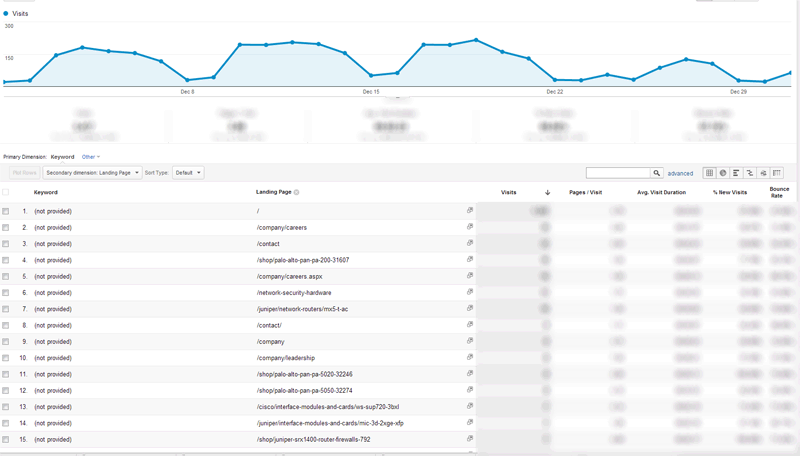
You can click (not provided) and view the landing pages as a secondary dimension to at least figure out what pages are being viewed the most. You could also compare this to the known organic keyword traffic and attribute a estimated percentage in distribution to each known organic keyword.

Click to Enlarge - You could also do unique page views for increased accuracy to attribute to other relateed keywords for each individual content page.